

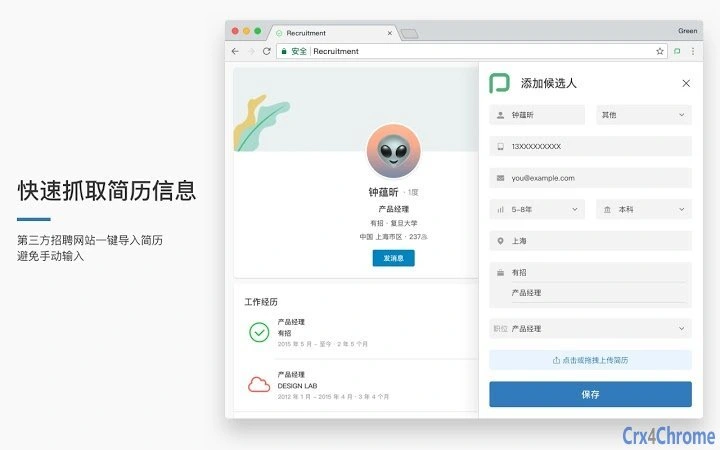
Description
Automated Resume Import for Recruitment
Overview
The software is designed to streamline the recruitment process by enabling users to quickly extract and import resume data from third-party job boards. It eliminates the need for manual data entry, reducing time and minimizing human error. This tool is particularly useful for HR professionals, recruitment specialists, and hiring managers who manage high volumes of candidate applications across multiple platforms.
By integrating with external job sites, the application allows for one-click import of candidate profiles, accelerating the initial screening phase. It also supports the upload of resume attachments, which the system can parse and import into the user’s recruitment workflow. This functionality enhances efficiency in candidate tracking and helps maintain a consistent data flow between external sources and internal hiring systems.
Target users include recruitment teams in mid-sized to large organizations, staffing agencies, and in-house HR departments. The software is built to support seamless job posting across third-party platforms, reducing the need for repetitive manual uploads. Its core purpose is to simplify the candidate acquisition process, allowing teams to focus more on evaluation and less on administrative tasks.
The developer, 有招, did not provide additional details about their background or history. Platform compatibility is confirmed for both Windows and Mac, making it accessible to a broad user base. Real-world use cases include managing job campaigns, processing inbound applications, and synchronizing candidate data across systems.
Key Features & Capabilities
- One-Click Resume Import – Automatically captures candidate resume information from third-party job boards, enabling rapid data transfer without manual input.
- Attachment Upload & Parsing – Supports uploading resume files, which the system can analyze and extract structured data for import into the recruitment platform.
- Multi-Platform Job Posting – Assists in publishing job listings to external recruitment websites, reducing the need for repeated manual submissions.
- Integration with Recruitment Workflows – Designed to fit into existing hiring pipelines, ensuring smooth data flow from external sources to internal systems.
- Efficient Candidate Data Management – Centralizes candidate information from diverse sources, improving visibility and organization during the hiring process.
These features are especially beneficial in high-volume hiring scenarios, where speed and accuracy are critical. For example, a recruitment team can import dozens of resumes in minutes, rather than hours, and publish a single job post across multiple sites with minimal effort. The system’s ability to handle attachments and parse content supports a more comprehensive evaluation of candidates, even when information is presented in non-standard formats.
By automating repetitive tasks, the software reduces the administrative burden on HR staff. It also helps maintain data consistency across platforms, minimizing discrepancies that can arise from manual entry. The tool is ideal for organizations seeking to improve recruitment efficiency without requiring extensive technical setup.
User Interface, Workflow & Performance
The user interface is designed with simplicity and functionality in mind, focusing on minimizing user steps during critical recruitment tasks. Navigation is structured around core actions: importing resumes, uploading attachments, and posting jobs. The layout emphasizes clarity, with clearly labeled buttons and intuitive workflows.
Users can initiate a resume import directly from the browser interface, with minimal interaction required. The process is streamlined to reduce friction, allowing users to move quickly between tasks. Workflow efficiency is enhanced by the tool’s ability to batch process multiple resumes and job postings, supporting scalable recruitment operations.
Performance observations are based on general software behavior patterns. The application operates within a 15.6 MB installation size, suggesting a lightweight footprint. The developer did not specify resource usage details, so actual CPU or RAM behavior remains unknown. Stability is expected to be consistent for typical usage, but no user-reported issues were provided.
Overall, the interface prioritizes usability, making it accessible even to non-technical team members. The design supports rapid adoption across HR departments, reducing training time and increasing team productivity. The lack of detailed performance metrics does not detract from its functional value, as the tool focuses on task automation rather than high-end processing demands.
Compatibility & System Requirements
The software is compatible with both Windows and Mac operating systems, offering broad accessibility across desktop environments. It supports the latest versions of these platforms, ensuring seamless integration with modern computing setups.
The installation size is 15.6 MB, indicating a compact footprint that does not strain system resources. This makes it suitable for use on machines with limited storage or older hardware. The developer did not specify exact system requirements, such as minimum RAM, CPU, or disk space. As a result, users should consider general compatibility standards when installing.
Platform compatibility information is limited to the operating systems listed. No details were provided about compatibility with virtual machines, remote desktop environments, or specific hardware configurations. Users are advised to test the application in their environment to confirm optimal performance.
Pros and Cons
Pros
- Eliminates manual resume data entry, saving time and reducing errors
- Supports one-click import from third-party job boards
- Handles resume attachments and system parsing for better data accuracy
- Enables bulk job posting across multiple platforms
- Lightweight installation at 15.6 MB
- Available at no cost, making it accessible to small and mid-sized teams
Cons
- Exact system requirements were not listed
- Performance details, including CPU and RAM usage, were not specified
- Developer background and company history were not provided
- Limited information on update frequency or support channels
- No details on data security or encryption practices
FAQ Section
Is this software compatible with Windows and Mac?
Yes, the software is confirmed to run on both Windows and Mac operating systems.
Is the software free to use?
Yes, the software is available at no cost.
Does the software require an internet connection?
Yes, since it interacts with third-party job boards and recruitment platforms, an active internet connection is required for full functionality.
Can I use this tool offline?
Offline usage is not supported, as the software relies on external services for resume import and job posting.
What type of license does this software use?
The licensing model was not specified in the provided information.
Final Thoughts + CTA
This desktop application offers a practical solution for recruitment teams seeking to automate repetitive tasks in candidate acquisition. By enabling one-click resume import and multi-platform job posting, it significantly reduces administrative overhead. Its lightweight design and free access make it an attractive option for HR professionals and hiring managers across various organization sizes.
While some details such as system requirements, performance metrics, and security practices are not publicly available, the core functionality is well-aligned with modern recruitment needs. The tool’s ability to parse attachments and integrate with external platforms adds tangible value to the hiring workflow.
For teams managing high volumes of applications or frequent job postings, this software delivers a meaningful efficiency boost. It is particularly suited for organizations that prioritize speed, accuracy, and workflow consistency.
Download 有招 now
Guides & Tutorials for 有招招聘助手 Extension for Chrome
How to install 有招招聘助手 Extension for Chrome
- Click the Preview / Download button above.
- Once redirected, accept the terms and click Install.
- Wait for the 有招招聘助手 Extension for Chrome download to finish on your device.
How to use 有招招聘助手 Extension for Chrome
This software is primarily used for its core features described above. Open the app after installation to explore its capabilities.
User Reviews for 有招招聘助手 Extension for Chrome 0
No reviews found





